EXHIBITION PLANNING FOR CURATORS & GALLERY TEAMS

Vernissage.

Plan the exhibition.
Before the first work arrives.

A working space for curators, exhibition designers and installation teams. Arrange works inside a model of the actual gallery, test the hang and turn decisions into clear installation documents.

Built around the practical needs of Instytut Fotografii Fort, including the challenge of preparing an exhibition with artists and partners in different countries.

Open the curator workspace ↗Private access · planning tools first, visitor tours when you are ready.
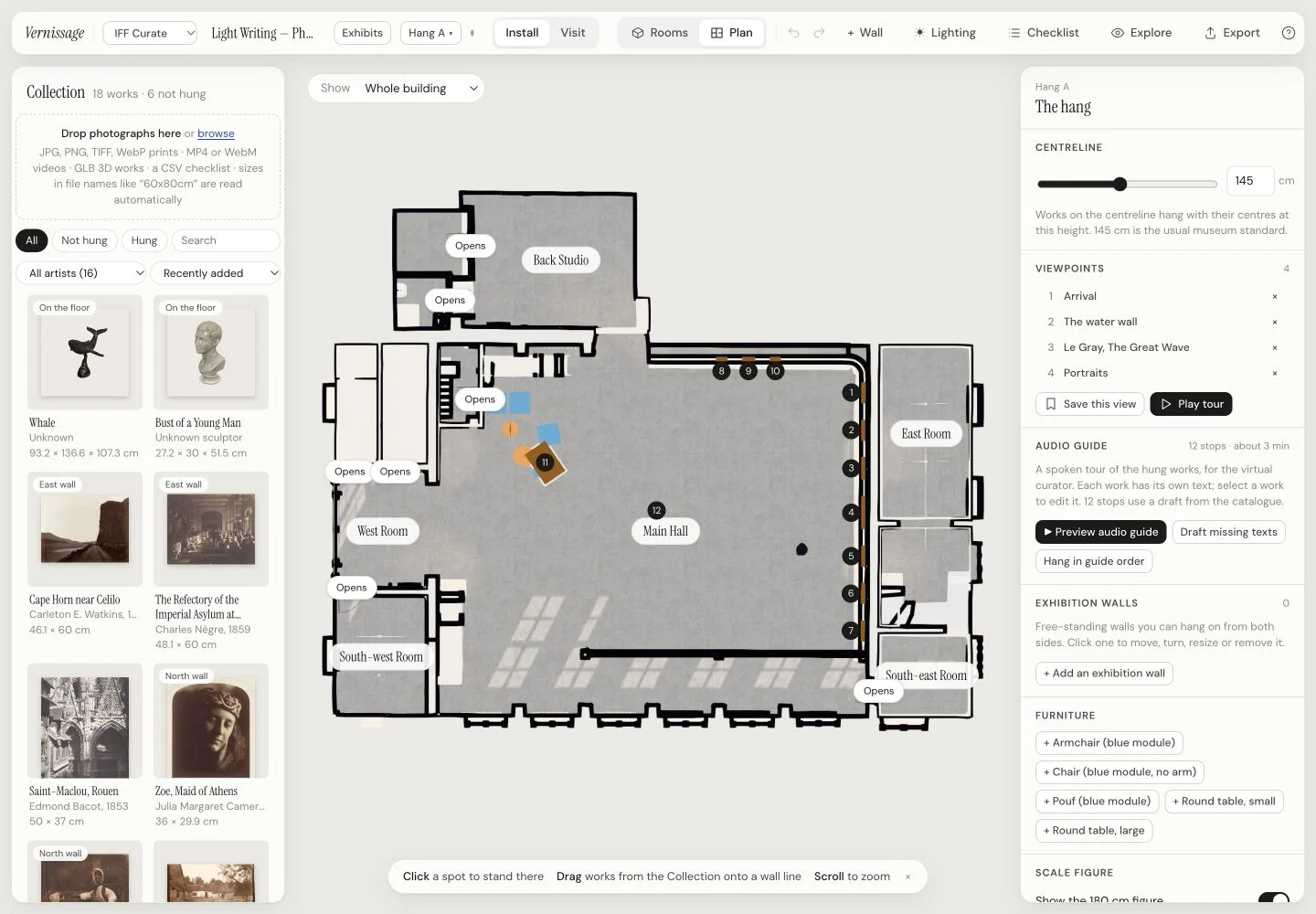
Actual Vernissage curator workspace showing the IFF floor plan, collection thumbnails, artwork positions and hang controls
THE CURATOR’S WORKSPACEActual app · IFF gallery model · demonstration collection
01 / PLAN & CURATE

Work on the exhibition.
See the consequences.

From the first checklist to the final hang.
Practical tools for decisions that matter in the room.

01

Bring the collection together.

Drop in artwork images and match them with a CSV or JSON checklist. Keep the title, artist, year, medium, dimensions, wall label and internal notes with each work. Plan with an “image to come” placeholder while material is still being gathered.

  • JPG, PNG, WebP and TIFF images
  • Dimensions from checklists, sidecars or file names
  • Collection thumbnails and editable catalogue details
02

Hang at real scale.

Move between the floor plan and a walk through the rooms. Drag works onto walls, enter their dimensions and set the centre height and distance from the wall’s left edge. Check how the sequence feels from a visitor’s viewpoint.

  • An adjustable hanging centreline
  • Snapping to the wall centre and neighbouring works
  • Align tops or bottoms, space evenly, centre a group
03

Resolve the presentation.

Try the crop, the frame and the space around the image before making production decisions. See the framed dimensions as well as the image size, and check effective print resolution at the chosen scale.

  • Fixed-ratio and adjustable cropping
  • Frame options, passe-partout width and colour
  • Paper or stretched canvas, with canvas depth
04

Test the room, too.

Add temporary exhibition walls, turn them, set their dimensions and work with both faces. Explore circulation, door openings and sightlines. Use the movable 180 cm scale figure to judge how the installation relates to a person.

  • Temporary wall size, angle, colour and doorways
  • Mark walls available or unavailable for hanging
  • Position furniture and check clearances on the plan
05

Compare the alternatives.

Duplicate a hang to try another arrangement, start an empty version, or keep several exhibitions for the same gallery. Switch between options and use undo and redo while refining a decision.

  • Named hang versions and separate exhibits
  • Automatic saving in the current browser
  • A portable exhibition file for sharing and archiving
06

Build the narrative.

Write the spoken passage for each work, arrange the guide’s stop order and save viewpoints through the exhibition. Preview the guide while developing the hang, then export its text for recording or voice production.

  • Editable wall labels and per-work guide scripts
  • Saved viewpoints and a guided route
  • “Hang in guide order” to test the narrative sequence
BEYOND A PHOTOGRAPHIC HANG

Objects, moving image and light.

Place GLB works on the floor or suspend them from the ceiling; set dimensions, rotation, mounting height and a plinth where needed. Video works can be placed in the exhibition with sound controls. In galleries with lighting controls enabled, adjust lamp position, aim, beam, warmth and brightness, plus time of day.

Working with your venue. The gallery model is prepared from a survey or suitable 3D data as part of setup. Artwork sizes and positions use real-world dimensions. Your confirmed survey and artwork measurements remain the reference for installation.

02 / EXPORT & HAND OVER

A plan others
can work from.

For the artist, registrar, print studio
and the team installing the show.

Export formats available in the current Vernissage app
Take awayFormatWhat it gives your team
Wall elevationsPDFScaled wall drawings with the works, dimensions, distances, centre heights and bottom-edge heights for the installation team.
Exhibition checklistPDFCSVArtwork details, image and framed sizes, presentation, room, wall and position. The CSV also carries fields such as effective resolution, descriptions, caveats and notes for further work in a spreadsheet.
Pictures of the spacePNGThe current view without editing tools, at 2× screen dimensions or the print-size 4× option. Useful for discussing an arrangement with artists and colleagues.
Audio-guide scriptJSONMarkdownOrdered stops and spoken text: structured JSON for voice production, plus a readable .md script for editorial review or recording.
Portable exhibition.vernissageThe exhibition document and image files in one package. Pass a version to a colleague, archive a hang, or reopen it as a separate exhibit.

A clear version to share.

Planning edits are saved in the browser you are using. Export a .vernissage file when you want to move that version to another device or send it to a colleague. A hosted visitor exhibition is published separately, so the team can review the hang before it opens.

Explore the planning workspace ↗
03 / THEN, WELCOME VISITORS

The gallery’s second life.
Open to a wider audience.

Once the exhibition is ready,
turn the space into a virtual visit.

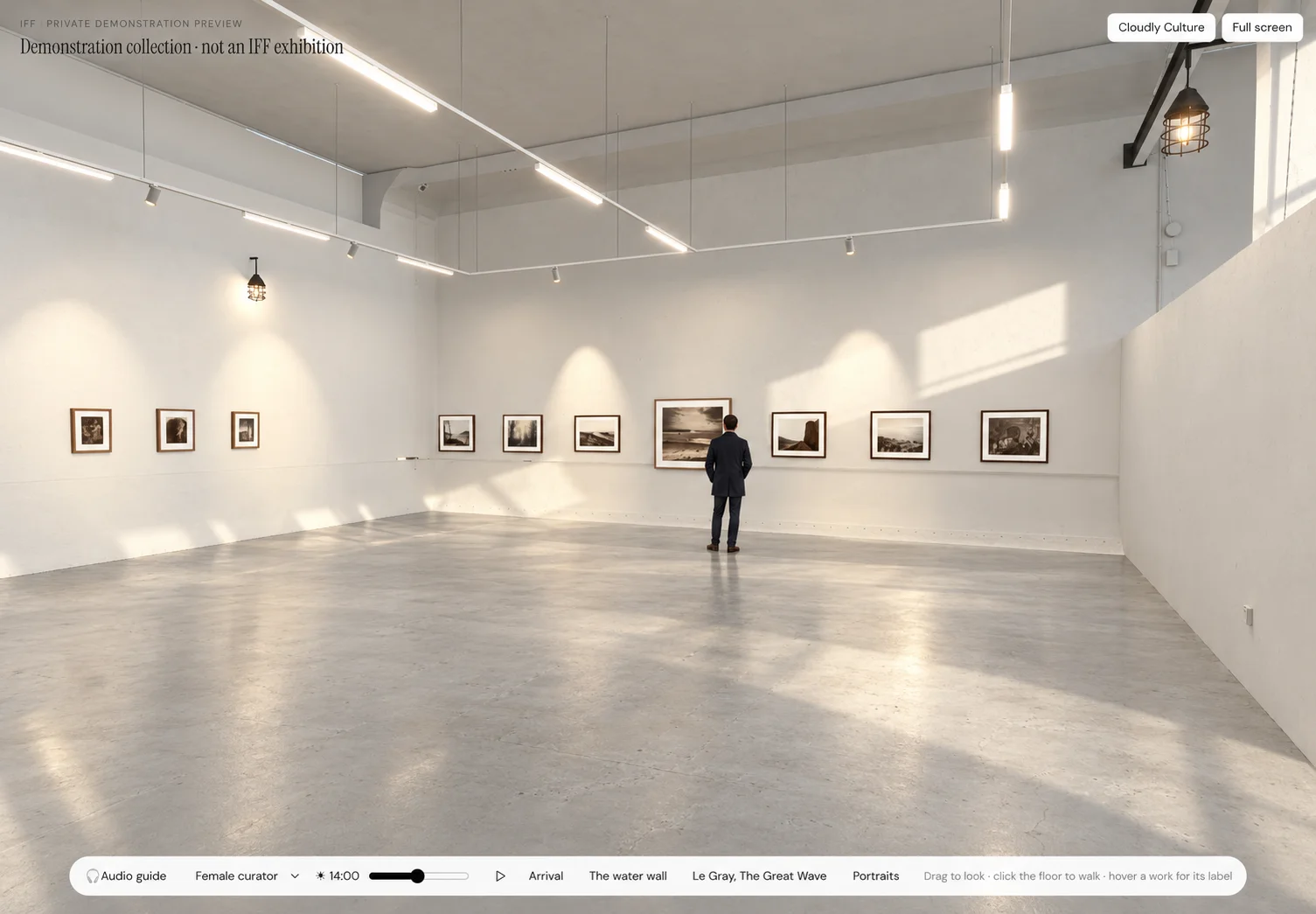
AI-enhanced visualisation of the IFF demonstration gallery with a visitor looking at framed photographs
THE VISITOR EXPERIENCEIFF demonstration · AI-enhanced visualisation
01 / EXPLORE

A visit at their own pace.

Visitors move through the gallery, choose where to pause and read the work’s label and description. The visitor view presents the exhibition without curator editing controls.

02 / FOLLOW

A route through the story.

Saved viewpoints and ordered stops give the exhibition a guided sequence. Visitors can follow the tour or take over and find their own way.

03 / LISTEN OR READ

The curator’s words travel.

Use the exhibition’s guide text with recorded narration where prepared, or a device voice. Text remains available alongside the spoken guide.

Open the private IFF visitor demonstration ↗

The current IFF preview is a clearly labelled demonstration collection, not a published IFF exhibition.

FOR CURATORS, EXHIBITION DESIGNERS & GALLERY TEAMS

Start with the work.
And the room it needs.

Tell us about the venue, the collection and the exhibition you are preparing. We can discuss the gallery model, the planning workflow and the visitor experience that follows.

Talk to us about your exhibition ↗